Introduction
Create Context Graph is an interactive CLI scaffolding tool that generates complete, domain-specific context graph applications. Think of it as create-next-app, but for AI agents backed by graph memory.
Given a domain (like healthcare, financial services, or wildlife management) and an agent framework, it generates a full-stack application: a FastAPI backend with a configured AI agent, a Next.js + Chakra UI frontend with NVL graph visualization, a Neo4j schema with synthetic data, and domain-specific tools that let the agent query and reason over your knowledge graph.
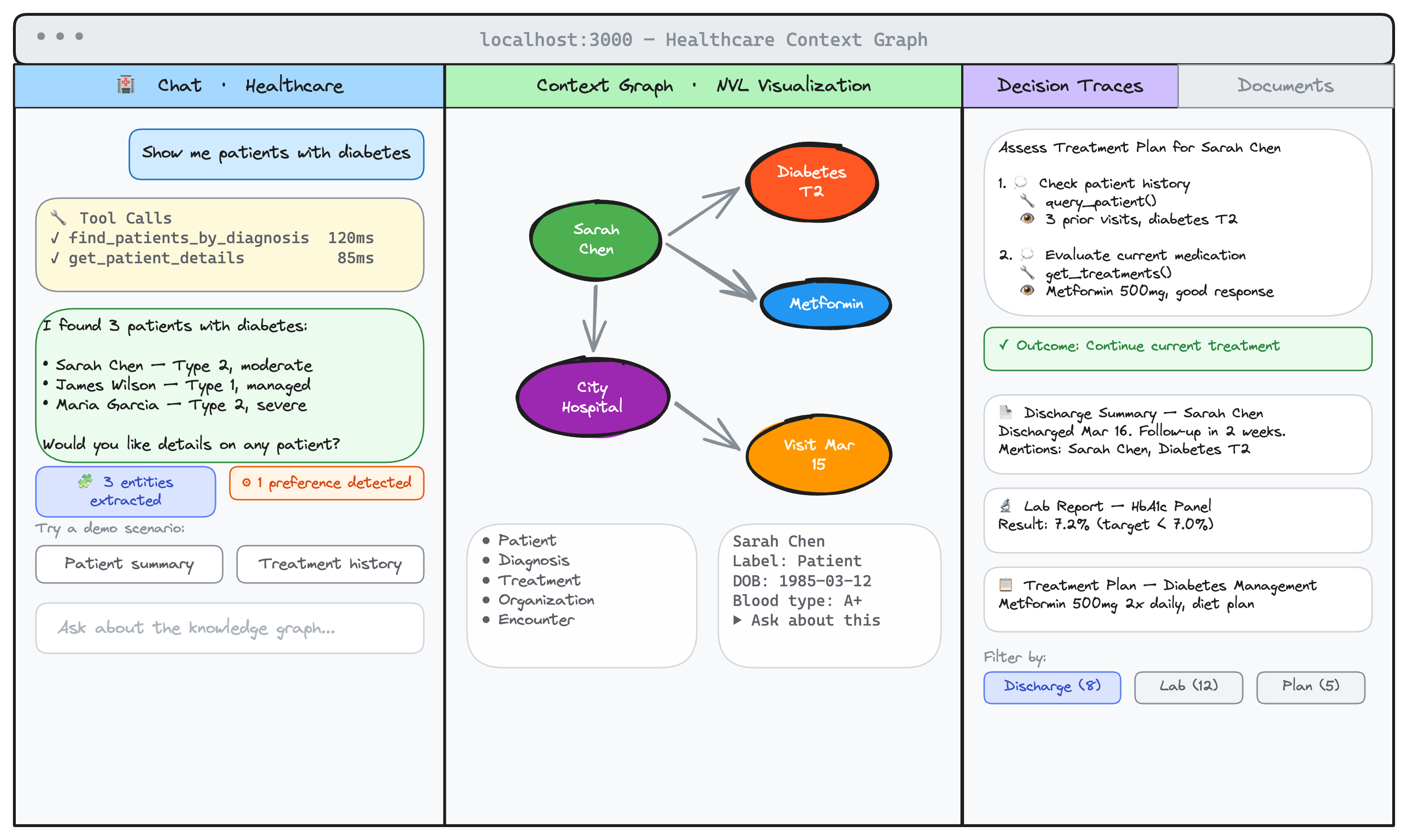
The POLE+O entity model is the foundation for all context graphs: Person, Organization, Location, Event, plus Object. Every domain ontology inherits these five base types and adds domain-specific subtypes. See How Domain Ontologies Work for details.
Key Features
- 22 built-in domains -- Healthcare, financial services, real estate, manufacturing, scientific research, software engineering, and more. Each ships with a complete ontology, agent tools, demo scenarios, and fixture data.
- 8 agent frameworks -- PydanticAI, Claude Agent SDK, OpenAI Agents SDK, LangGraph, CrewAI, Strands, Google ADK, and Anthropic Tools.
- Multi-turn conversations -- Every agent uses neo4j-agent-memory for conversation persistence with automatic entity extraction and preference detection.
- Graph-native AI agents -- Cypher-powered tools for querying entities, relationships, and decision traces. Tool calls stream in real-time with live progress indicators.
- Streaming chat -- Token-by-token responses via Server-Sent Events. Tool calls appear as a live timeline with spinner indicators. Graph visualization updates incrementally after each tool completes.
- Interactive graph visualization -- NVL-powered graph explorer with entity detail panel, document browser with template filtering, and decision trace viewer.
- Rich demo data -- LLM-generated fixture data per domain: 80-90 entities, 25+ professional documents, and 3-5 multi-step decision traces. Loaded via
make seed. - Flexible Neo4j setup -- Neo4j Aura (free cloud),
@johnymontana/neo4j-local, Docker Compose, or any existing instance. - 12 SaaS data connectors -- GitHub (
github), Slack (slack), Jira (jira), Notion (notion), Gmail (gmail), Google Calendar (gcal), Salesforce (salesforce), Linear (linear), Google Workspace (google-workspace), Claude Code (claude-code), Claude AI (claude-ai), and ChatGPT (chatgpt). Use the ID in parentheses with--connector. - Custom domains -- Describe your domain in natural language to generate a complete ontology, or write your own YAML definition.
- MCP server for Claude Desktop -- Optionally generate an MCP server config so Claude Desktop queries the same knowledge graph as your web app.
Quick Install
No installation required. Run directly with uvx (Python) or npx (Node.js):
# Python (recommended)
uvx create-context-graph

# Node.js
npx create-context-graph
See the Quick Start for a complete walkthrough, or skip the wizard with flags:
uvx create-context-graph my-app --domain healthcare --framework pydanticai --demo-data
See All Available Domains
uvx create-context-graph --list-domains
Architecture
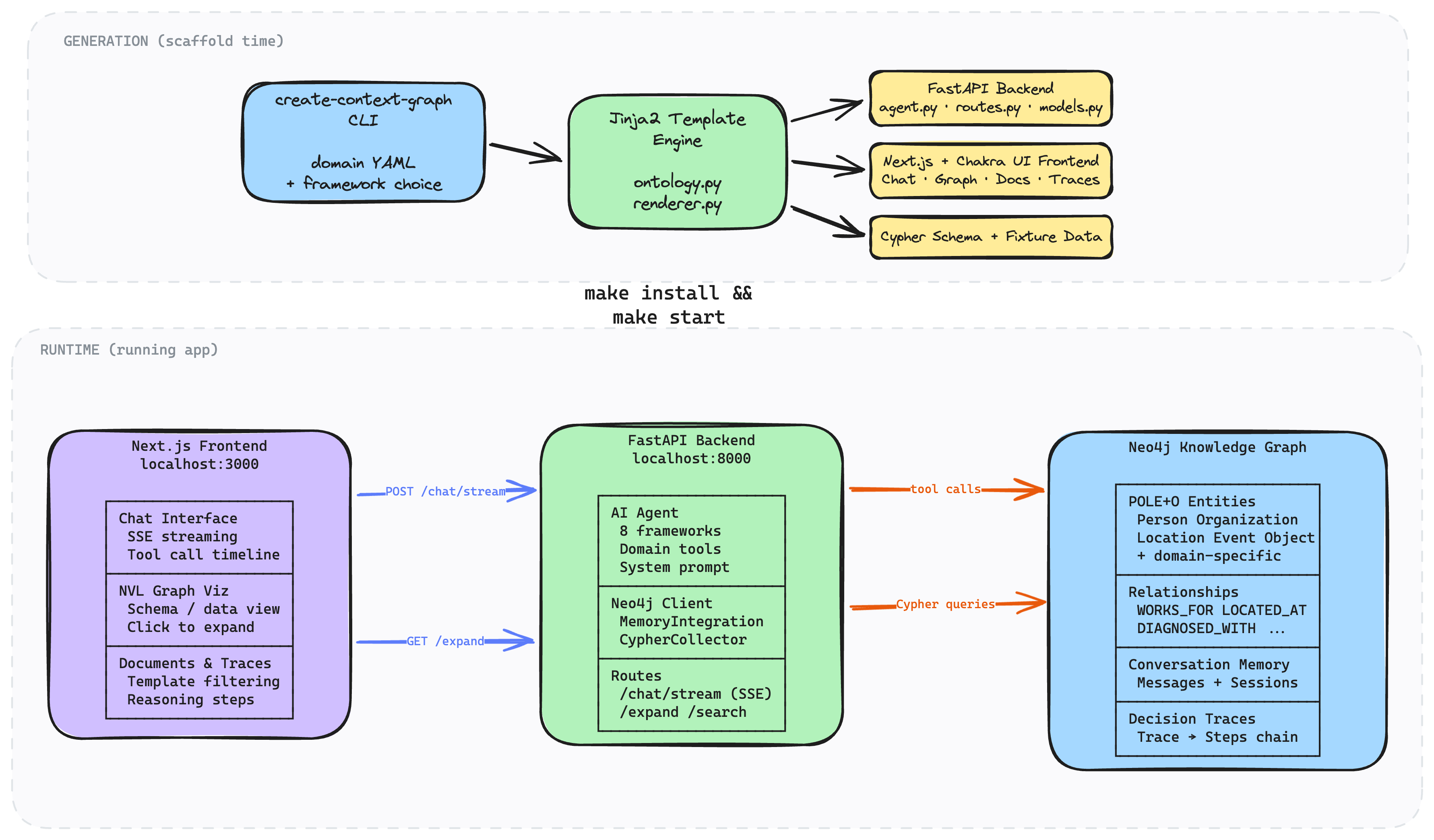
The top half shows generation: the CLI reads a domain ontology YAML and renders Jinja2 templates into a complete project (FastAPI backend, Next.js frontend, Cypher schema + fixture data). The bottom half shows the running application: the frontend streams chat responses via SSE, the backend agent executes Cypher tool calls against Neo4j, and the graph visualization updates incrementally as each tool completes.
Reading Guide
Choose your path based on what you want to do:
- New to context graphs? Start with Why Context Graphs, then follow the Quick Start.
- Want to build your first app? Follow the First Context Graph App tutorial (15-20 min).
- Importing real data? See Import SaaS Data or the connector tutorials (Linear, Google Workspace, Claude Code).
- Building a custom domain? Read How Domain Ontologies Work, then follow Customizing Your Ontology.
- Comparing frameworks? See the Framework Comparison or Switch Frameworks.
What's Next
- Quick Start -- get a running app in under 5 minutes.
- Your First Context Graph App -- step-by-step tutorial to create, run, and explore a generated application.
- Why Context Graphs -- understand the conceptual foundation behind graph-based agent memory.
- Three Memory Types -- how short-term, long-term, and reasoning memory work together.
- Domain Catalog -- browse all 22 built-in domains with entity types and sample questions.
- Import SaaS Data -- connect your existing tools to populate the knowledge graph.
- Switch Frameworks -- compare and switch between 8 agent frameworks.