Building Your First Linear Context Graph
Time: ~15-20 minutes | Level: Intermediate | Prerequisites: Python 3.11+, Node.js 18+, Neo4j, Linear API key
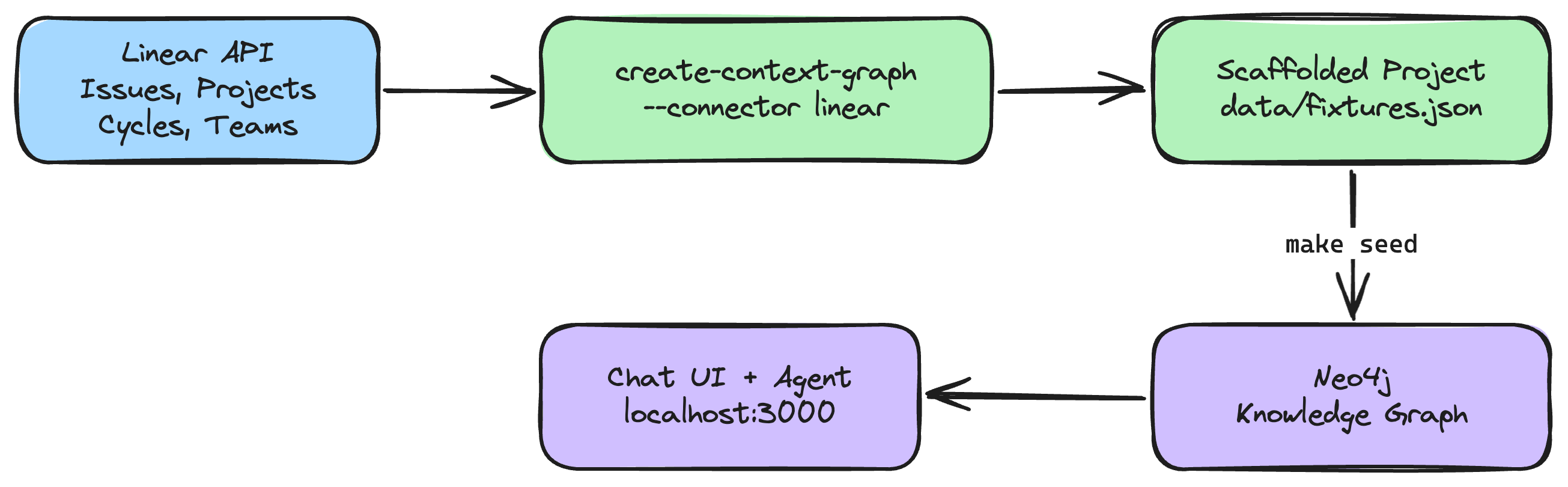
This tutorial walks you through importing your real Linear workspace data into a Neo4j context graph and querying it with an AI agent. By the end, you'll have a running app where you can ask natural language questions about your issues, projects, cycles, and team workload -- backed by a connected graph of your actual project data.
What you'll build
A full-stack application that:
- Imports your Linear issues, projects, cycles, teams, users, labels, and workflow states into Neo4j
- Maps all Linear relationships (issue assignments, project membership, cycle tracking, sub-issue hierarchies) into graph edges
- Provides an AI agent that can traverse the graph to answer questions like "What's blocking the v2 launch?" or "Who has bandwidth this cycle?"
- Visualizes the graph interactively with the NVL graph component
Agent tools
The generated agent includes the software-engineering domain tools for querying your Linear data in the knowledge graph. The Linear connector imports your workspace data; the domain ontology provides the agent tools that query it.
| Tool | Description |
|---|---|
search_developer | Search for developers by name or role |
get_service_health | Get the health status and dependencies of a service |
find_similar_incidents | Find past incidents similar to a current one |
get_deployment_history | Get deployment history for a service |
get_pr_impact | Trace the impact of a pull request through deployments and incidents |
list_repositories | List Repository records with optional limit |
get_repository_by_name | Get a specific Repository by name with all connections |
These tools work with your imported Linear data because Linear entities (Issues, Projects, Cycles, etc.) are mapped to the software-engineering domain's POLE+O entity model. The agent uses Cypher queries to traverse the graph, so questions like "What's blocking ENG-101?" traverse the BLOCKS relationships imported from Linear.
Prerequisites
Before you begin, make sure you have:
- Python 3.11+ -- check with
python3 --version - Node.js 18+ -- check with
node --version - Neo4j -- one of:
- Neo4j Aura (free cloud instance)
- Docker:
docker run -p 7474:7474 -p 7687:7687 -e NEO4J_AUTH=neo4j/password neo4j:5 - neo4j-local:
npx @johnymontana/neo4j-local
- uv (recommended) -- install with
curl -LsSf https://astral.sh/uv/install.sh | sh - A Linear API key -- see Step 1 below
- An LLM API key --
ANTHROPIC_API_KEY(for most frameworks) orOPENAI_API_KEY/GOOGLE_API_KEYdepending on your framework choice
If you see requires-python >= 3.11 errors during installation, your active Python is too old. Common fixes:
- pyenv:
pyenv install 3.12 && pyenv local 3.12 - Homebrew (macOS):
brew install python@3.12 - Ubuntu (deadsnakes PPA):
sudo add-apt-repository ppa:deadsnakes/ppa && sudo apt install python3.12 - uv:
uv python install 3.12
Check with python3 --version (not just python --version, which may point to an older version on some systems).
Step 1: Create a Linear API Key
- Open Linear and go to Settings > Security & Access > API (or navigate directly to
linear.app/settings/api). - Click Create key to generate a personal API key.
- Copy the key -- it starts with
lin_api_. You'll use this in the next step.
Linear API keys have read access to your entire workspace. The import is read-only -- nothing is written back to Linear.
Step 2: Scaffold the Project (~2 min)
Run the CLI with the --connector linear flag:
uvx create-context-graph my-linear-app \
  --domain software-engineering \
  --framework pydanticai \
  --connector linear \
  --linear-api-key lin_api_xxxxx
Replace lin_api_xxxxx with your actual API key. You can also set it as an environment variable:
export LINEAR_API_KEY=lin_api_xxxxx
uvx create-context-graph my-linear-app \
  --domain software-engineering \
  --framework pydanticai \
  --connector linear
Filtering by team
If your workspace has multiple teams and you only want to import one, add the --linear-team flag with the team's URL key (the short code you see in Linear URLs, like ENG or PROD):
uvx create-context-graph my-linear-app \
  --domain software-engineering \
  --framework pydanticai \
  --connector linear \
  --linear-team ENG
What happens during scaffolding
The CLI will:
- Validate your API key by calling Linear's
viewerquery - Fetch your workspace data -- teams, users, labels, projects, cycles, and issues (with cursor-based pagination for large workspaces)
- Transform the data into the POLE+O entity model used by neo4j-agent-memory
- Write it to
data/fixtures.jsonin the generated project - Generate the full application -- FastAPI backend, Next.js frontend, Neo4j schema, and AI agent
You'll see output like:
Importing data from connected services...
  Connecting to Linear...
  Fetching data from Linear...
  ✓ Linear: 342 entities, 89 documents
Step 3: Configure and Seed (~3 min)
Navigate to your project:
cd my-linear-app
Configure your environment by copying the example file and editing it:
cp .env.example .env
Edit .env with your credentials:
# .env
NEO4J_URI=neo4j://localhost:7687
NEO4J_USERNAME=neo4j
NEO4J_PASSWORD=password
LINEAR_API_KEY=lin_api_xxxxx
ANTHROPIC_API_KEY=sk-ant-...
If you're using Neo4j Aura, set NEO4J_URI=neo4j+s://xxxxxxxx.databases.neo4j.io with the connection URI from your Aura console.
Install dependencies for both backend and frontend:
make install
Verify your Neo4j connection (optional but recommended):
make test-connection
Seed the data into Neo4j:
make seed
This loads entities, relationships, and documents from data/fixtures.json into your Neo4j instance. You should see output similar to:
Creating schema constraints and indexes...
Loading fixture data...
  Created 342 entities across 12 node labels
  Created 1024 relationships across 26 relationship types
  Created 89 documents with MENTIONS links
  Created 15 decision traces
Done. Knowledge graph ready.
Step 4: Start the Application (~1 min)
The application has two components: a FastAPI backend (port 8000) and a Next.js frontend (port 3000).
Using make start (recommended):
make start
This runs both the backend and frontend concurrently. You should see:
Starting backend on http://localhost:8000...
Starting frontend on http://localhost:3000...
Alternative: two separate terminals (useful for debugging):
# Terminal 1: Backend
cd backend && make dev

# Terminal 2: Frontend
cd frontend && npm run dev
Once both are running, open http://localhost:3000 in your browser.
Step 5: Explore Your Linear Data as a Graph
Schema view
When the app loads, you'll see the graph schema view showing the entity types and relationships imported from Linear:
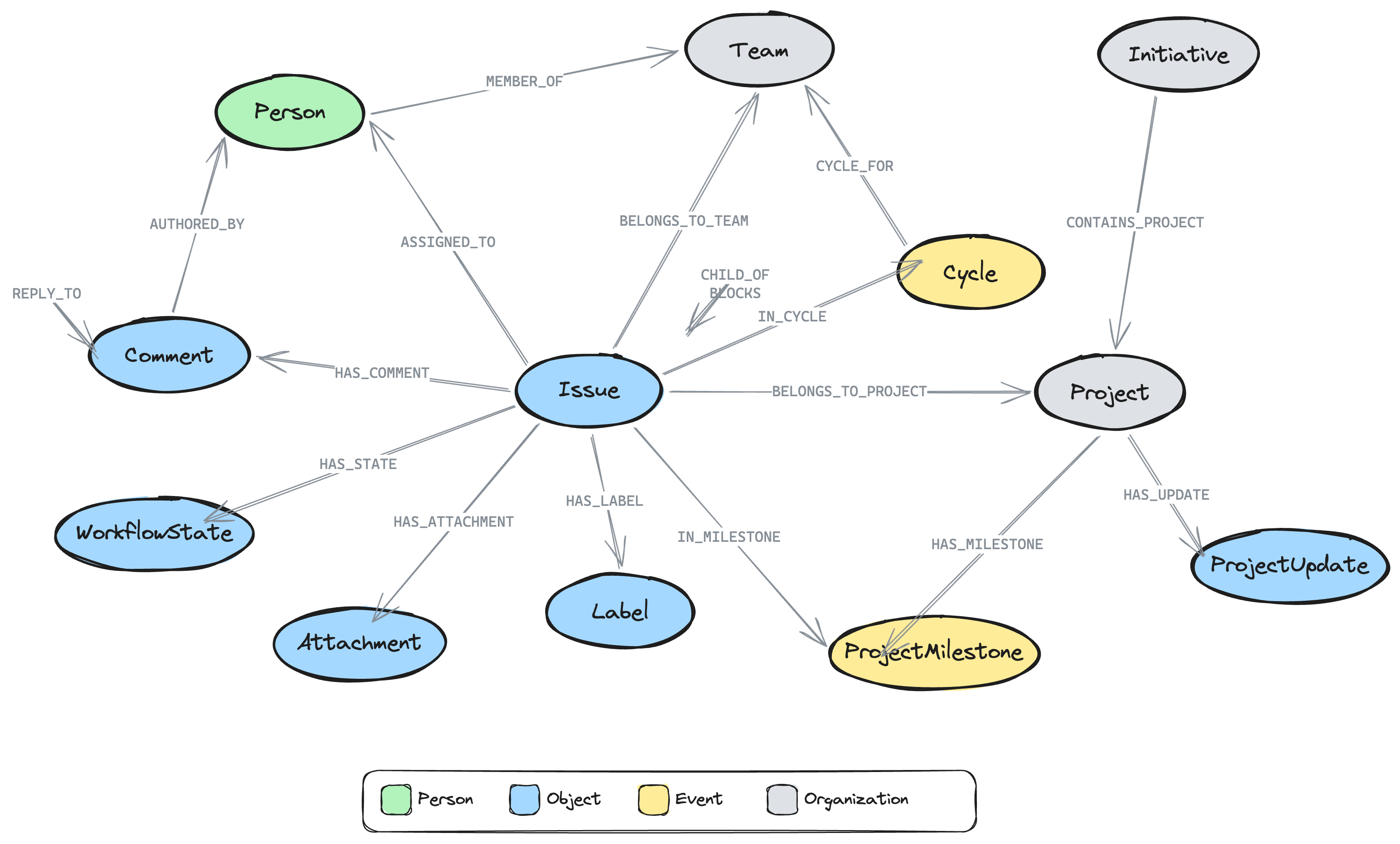
- Issue nodes connected to Person (via ASSIGNED_TO, CREATED_BY), Project (via BELONGS_TO_PROJECT), Cycle (via IN_CYCLE), Team (via BELONGS_TO_TEAM), Label (via HAS_LABEL), WorkflowState (via HAS_STATE), and ProjectMilestone (via IN_MILESTONE)
- Issue → Issue relationships: CHILD_OF (sub-issues), BLOCKS, BLOCKED_BY, RELATED_TO, DUPLICATE_OF
- Comment nodes with threading: HAS_COMMENT from Issues, REPLY_TO between comments, RESOLVED_BY linking to the person who resolved a thread
- Project nodes with HAS_MILESTONE → ProjectMilestone, HAS_UPDATE → ProjectUpdate
- Initiative nodes (top-level planning) with CONTAINS_PROJECT → Project, OWNED_BY → Person
- Attachment nodes linked to issues via HAS_ATTACHMENT (Figma, GitHub PRs, Slack messages)
- Person nodes connected to Team and Project (via MEMBER_OF)
Double-click any schema node to load actual instances of that type.
Decision traces from issue history
The connector automatically transforms issue history into decision traces -- the same format used by neo4j-agent-memory for reasoning memory. Each issue with 2+ history entries generates a trace:
- Task: "Lifecycle of ENG-101 Fix login bug"
- Steps: Each state transition, assignment change, or priority change becomes a thought/action/observation triple
- Outcome: Derived from the issue's current state (completed, canceled, or in-progress)
This means the agent can answer questions like "What decisions were made about ENG-101?" or "How did this issue get to its current state?" by traversing the decision trace graph.
Ask the agent
Try these questions in the chat panel:
- "What issues are assigned to [your name]?" -- Finds your open assignments
- "Show me all issues in the current cycle" -- Traverses Cycle relationships
- "What's the status of the [project name] project?" -- Aggregates issue states for a project
- "Find all issues labeled Bug with High priority" -- Filters by label and priority
- "What's blocking ENG-101?" -- Traverses BLOCKS/BLOCKED_BY relations between issues
- "Who is working on the most issues right now?" -- Aggregates assignments across team members
- "What are the milestones for the v2 Launch project?" -- Traverses HAS_MILESTONE relationships
- "Show me the latest project updates" -- Finds ProjectUpdate nodes with health status
- "What decisions were made about ENG-101?" -- Traverses DecisionTrace → TraceStep chains
- "Are there any resolved comment threads?" -- Finds comments with RESOLVED_BY relationships
The agent uses Cypher queries to traverse your graph, so it can answer multi-hop questions that would require clicking through multiple Linear views.
Graph visualization
As you chat with the agent, the graph visualization updates in real-time. Each tool call result flows into the graph view, showing the nodes and relationships that the agent queried. You can:
- Double-click a node to expand its neighbors
- Drag nodes to rearrange the layout
- Click a node to see its properties
- Use the "Ask about this" button to send a query about a specific entity
Understanding the Graph Schema
The Linear connector maps your data to the POLE+O entity model used by neo4j-agent-memory. POLE+O categorizes every entity as one of five types: Person, Organization (teams, companies), Location, Event (time-bounded occurrences), or Object (everything else -- issues, labels, workflow states). This classification enables cross-domain queries when combining multiple connectors.
| Linear Concept | Graph Label | POLE Type | Example Properties |
|---|---|---|---|
| Issue | Issue | Object | identifier, title, priority, stateType, dueDate, branchName, completedAt |
| Project | Project | Organization | name, state, progress, health, targetDate |
| Cycle (Sprint) | Cycle | Event | name, number, startsAt, endsAt, progress |
| Team | Team | Organization | name, key |
| User | Person | Person | name, email, displayName |
| Label | Label | Object | name, color |
| Workflow State | WorkflowState | Object | name, type (triage/backlog/started/completed) |
| Comment | Comment | Object | body, createdAt, resolvedAt |
| Project Update | ProjectUpdate | Object | body, health (onTrack/atRisk/offTrack), createdAt |
| Project Milestone | ProjectMilestone | Event | name, targetDate, status, progress |
| Initiative | Initiative | Organization | name, status (Planned/Active/Completed), health |
| Attachment | Attachment | Object | title, url, sourceType (figma, github, slack, etc.) |
Issue names follow the format "ENG-101 Fix login bug" (identifier + title) so they're easy to reference in queries.
Relationship types
The full set of relationship types imported:
| Relationship | From | To | Meaning |
|---|---|---|---|
ASSIGNED_TO | Issue | Person | Issue assignee |
CREATED_BY | Issue | Person | Issue creator |
BELONGS_TO_PROJECT | Issue | Project | Issue in project |
BELONGS_TO_TEAM | Issue | Team | Issue team |
IN_CYCLE | Issue | Cycle | Issue in sprint |
HAS_STATE | Issue | WorkflowState | Current workflow state |
HAS_LABEL | Issue | Label | Applied labels |
CHILD_OF | Issue | Issue | Sub-issue hierarchy |
BLOCKS | Issue | Issue | Blocking dependency |
BLOCKED_BY | Issue | Issue | Blocked by dependency |
RELATED_TO | Issue | Issue | Related issues |
DUPLICATE_OF | Issue | Issue | Duplicate link |
IN_MILESTONE | Issue | ProjectMilestone | Issue in milestone |
HAS_COMMENT | Issue | Comment | Issue comments |
HAS_ATTACHMENT | Issue | Attachment | Linked external resources |
REPLY_TO | Comment | Comment | Threaded reply |
AUTHORED_BY | Comment | Person | Comment author |
RESOLVED_BY | Comment | Person | Thread resolver |
HAS_UPDATE | Project | ProjectUpdate | Status updates |
POSTED_BY | ProjectUpdate | Person | Update author |
HAS_MILESTONE | Project | ProjectMilestone | Project milestones |
CONTAINS_PROJECT | Initiative | Project | Initiative grouping |
OWNED_BY | Initiative | Person | Initiative owner |
MEMBER_OF | Person | Team/Project | Membership |
LEADS | Person | Project | Project lead |
CYCLE_FOR | Cycle | Team | Cycle belongs to team |
Re-importing Updated Data
As your Linear workspace changes, you can re-import to keep the graph current:
# Re-import from Linear
make import

# Re-import and seed into Neo4j
make import-and-seed
The import uses MERGE operations, so re-importing is safe -- existing nodes are updated rather than duplicated.
These targets read credentials from your .env file:
# .env
LINEAR_API_KEY=lin_api_xxxxx
LINEAR_TEAM=ENG  # optional
Example Cypher Queries
Once your data is in Neo4j, you can also run raw Cypher queries via the agent's run_cypher tool or directly in Neo4j Browser (http://localhost:7474):
Find all issues related to an issue by shared labels
MATCH (i:Issue {identifier: 'ENG-101'})-[:HAS_LABEL]->(l)<-[:HAS_LABEL]-(related:Issue)
WHERE related <> i
RETURN related.identifier, related.title, l.name AS shared_label
Example result:
| related.identifier | related.title | shared_label |
|---|---|---|
| ENG-105 | Refactor auth middleware | Bug |
| ENG-112 | Fix session timeout | Bug |
| ENG-089 | Update OAuth scopes | Security |
Team workload by assignee
MATCH (p:Person)-[:MEMBER_OF]->(t:Team {name: 'Engineering'})
OPTIONAL MATCH (i:Issue)-[:ASSIGNED_TO]->(p)
WHERE i.stateType IN ['started', 'unstarted']
RETURN p.name, count(i) AS open_issues
ORDER BY open_issues DESC
Example result:
| p.name | open_issues |
|---|---|
| Sarah Chen | 8 |
| Alex Kim | 5 |
| Jordan Lee | 3 |
Current cycle progress
MATCH (i:Issue)-[:IN_CYCLE]->(c:Cycle)
WHERE c.endsAt > datetime().epochMillis
RETURN c.name, i.stateType, count(*) AS issue_count
ORDER BY c.name, i.stateType
Example result:
| c.name | stateType | issue_count |
|---|---|---|
| Sprint 24 | completed | 8 |
| Sprint 24 | started | 12 |
| Sprint 24 | unstarted | 5 |
Sub-issue hierarchy
MATCH path = (child:Issue)-[:CHILD_OF*]->(parent:Issue)
WHERE parent.identifier = 'ENG-100'
RETURN [n IN nodes(path) | n.identifier] AS hierarchy
Example result:
| hierarchy |
|---|
["ENG-100-1", "ENG-100"] |
["ENG-100-2", "ENG-100"] |
["ENG-100-2-a", "ENG-100-2", "ENG-100"] |
What's blocking an issue?
MATCH (i:Issue)-[:BLOCKS]->(blocked:Issue)
WHERE i.identifier = 'ENG-101'
RETURN blocked.identifier, blocked.title, blocked.stateType
Example result:
| blocked.identifier | blocked.title | blocked.stateType |
|---|---|---|
| ENG-115 | Deploy auth service | unstarted |
| ENG-118 | Update API docs | unstarted |
Find all blockers for a project
MATCH (i:Issue)-[:BELONGS_TO_PROJECT]->(p:Project {name: 'v2 Launch'})
MATCH (blocker:Issue)-[:BLOCKS]->(i)
WHERE blocker.stateType <> 'completed'
RETURN blocker.identifier, blocker.title, i.identifier AS blocked_issue
Example result:
| blocker.identifier | blocker.title | blocked_issue |
|---|---|---|
| ENG-101 | Fix login bug | ENG-115 |
| ENG-098 | Database migration | ENG-110 |
| ENG-103 | Update SDK | ENG-120 |
Resolved comment threads (decisions made)
MATCH (c:Comment)-[:RESOLVED_BY]->(resolver:Person)
MATCH (issue:Issue)-[:HAS_COMMENT]->(c)
RETURN issue.identifier, c.body, resolver.name, c.resolvedAt
ORDER BY c.resolvedAt DESC
Example result:
| issue.identifier | c.body | resolver.name | c.resolvedAt |
|---|---|---|---|
| ENG-101 | Should we use OAuth2 or SAML? | Sarah Chen | 2026-03-28T14:22:00 |
| ENG-095 | Which caching strategy? | Alex Kim | 2026-03-25T10:15:00 |
Comment thread with replies
MATCH (issue:Issue)-[:HAS_COMMENT]->(root:Comment)
WHERE NOT (root)-[:REPLY_TO]->()
OPTIONAL MATCH (reply:Comment)-[:REPLY_TO]->(root)
RETURN issue.identifier, root.body AS thread_start, collect(reply.body) AS replies
Example result:
| issue.identifier | thread_start | replies |
|---|---|---|
| ENG-101 | Should we use Redis or Memcached? | ["Redis supports data structures", "Agreed, let's go Redis"] |
| ENG-095 | Need to decide on the API versioning strategy | ["URL versioning is simpler", "Header versioning is cleaner"] |
Project milestone progress
MATCH (p:Project)-[:HAS_MILESTONE]->(ms:ProjectMilestone)
OPTIONAL MATCH (i:Issue)-[:IN_MILESTONE]->(ms)
RETURN ms.name, ms.targetDate, ms.status,
       count(i) AS total_issues,
       count(CASE WHEN i.stateType = 'completed' THEN 1 END) AS completed
Example result:
| ms.name | ms.targetDate | ms.status | total_issues | completed |
|---|---|---|---|---|
| Alpha Release | 2026-04-15 | Active | 12 | 8 |
| Beta Release | 2026-05-01 | Planned | 20 | 3 |
Initiative overview
MATCH (init:Initiative)-[:CONTAINS_PROJECT]->(p:Project)
OPTIONAL MATCH (init)-[:OWNED_BY]->(owner:Person)
RETURN init.name, init.status, init.health, owner.name,
       collect(p.name) AS projects
Example result:
| init.name | init.status | init.health | owner.name | projects |
|---|---|---|---|---|
| Platform Modernization | Active | onTrack | Sarah Chen | ["v2 Launch", "API Redesign"] |
| Security Hardening | Planned | atRisk | Alex Kim | ["Auth Overhaul", "Audit Logging"] |
External attachments on an issue
MATCH (i:Issue)-[:HAS_ATTACHMENT]->(a:Attachment)
WHERE i.identifier = 'ENG-101'
RETURN a.title, a.url, a.sourceType
Example result:
| a.title | a.url | a.sourceType |
|---|---|---|
| Auth flow mockup | https://figma.com/file/... | figma |
| Fix login bug #234 | https://github.com/org/repo/pull/234 | github |
Privacy and Security
The Linear connector is designed with privacy in mind:
- Read-only access: The API key is used for read-only queries. Nothing is written back to Linear.
- Scoped by team: Use
--linear-teamto limit the import to a single team's data. - Credentials stored locally: Your Linear API key is stored in
.envin your project directory, which is included in.gitignore. - No external dependencies: The connector uses Python's built-in
urllib-- no third-party API client libraries required at runtime.
If you import workspace data into a cloud Neo4j instance (e.g., Neo4j Aura), be aware that your issue titles, descriptions, comments, and team member names will be stored in the cloud. For sensitive workspaces, use a local Neo4j instance.
Troubleshooting
make seed fails with a connection error
Ensure Neo4j is running and your .env credentials are correct:
make test-connection
If this fails, verify that NEO4J_URI, NEO4J_USERNAME, and NEO4J_PASSWORD in your .env file match your Neo4j instance.
Linear API key invalid or expired
If you see authentication errors during scaffold, verify your API key:
- It should start with
lin_api_ - Generate a new one at Settings > Security & Access > API in Linear
Team key not found
If you use --linear-team with an incorrect key, the connector will list all available team keys in your workspace. Check that you're using the URL key (e.g., ENG) not the team name.
No data imported (0 entities)
If the import completes but shows 0 entities:
- Try without the
--linear-teamfilter to import all teams - Ensure your API key has access to the workspace (not just a specific team)
Python version error during scaffold
See the Python version guidance in Prerequisites above.
Port already in use
The backend uses port 8000 and the frontend uses port 3000. If either port is occupied:
lsof -ti:8000 | xargs kill
lsof -ti:3000 | xargs kill
Next Steps
- Add more connectors -- Combine Linear with GitHub (
--connector linear --connector github) to create a unified development graph linking issues to PRs and commits - Customize the domain -- Edit
data/ontology.yamlto add domain-specific entity types and tools - Build custom agent tools -- Add Cypher-powered tools to the agent for your specific workflow patterns
- Set up periodic sync -- Run
make import-and-seedon a schedule to keep the graph fresh - Enable debug logging -- Set
LOG_LEVEL=DEBUGto see detailed import progress including entity counts, pagination, and rate limit status
Ready for more? Continue with Decision Traces from Google Workspace to learn how to extract decisions from Google Docs comment threads.