Build a Developer Knowledge Graph from Claude Code Sessions
Time: ~15-20 minutes | Level: Intermediate | Prerequisites: Python 3.11+, Node.js 18+, Neo4j, Claude Code
This tutorial walks you through importing your Claude Code session history into a Neo4j context graph. Every session you've had with Claude Code -- the files you edited, the decisions you made, the errors you fixed, and the preferences you expressed -- becomes a connected, queryable knowledge graph.
By the end, you'll have an AI agent that can answer questions like "Why did we switch from REST to GraphQL?", "What files did I modify most last week?", and "What are my coding preferences across all projects?".
What you'll build
A full-stack application that:
- Imports your local Claude Code session files (
.jsonlformat) into Neo4j -- no API keys or authentication required - Extracts decision traces from user corrections, error-resolution cycles, and deliberation patterns
- Identifies developer preferences from explicit statements ("always use single quotes") and behavioral patterns (package install frequency)
- Maps tool call sequences into reasoning chains showing how the agent solved each task
- Provides 8 session intelligence agent tools for querying your development history
- Automatically redacts secrets (API keys, tokens, passwords) before storing content
Agent tools
| Tool | Description |
|---|---|
search_sessions | Full-text search across session message content |
decision_history | Find decisions related to a file, package, or topic |
file_timeline | File modification and read history across sessions |
error_patterns | Recurring errors and how they were resolved |
tool_usage_stats | Tool usage analytics across sessions |
my_preferences | Extracted preferences, optionally filtered by category |
project_overview | Summary stats for one or all projects |
reasoning_trace | Tool call chain for a specific session |
How it works
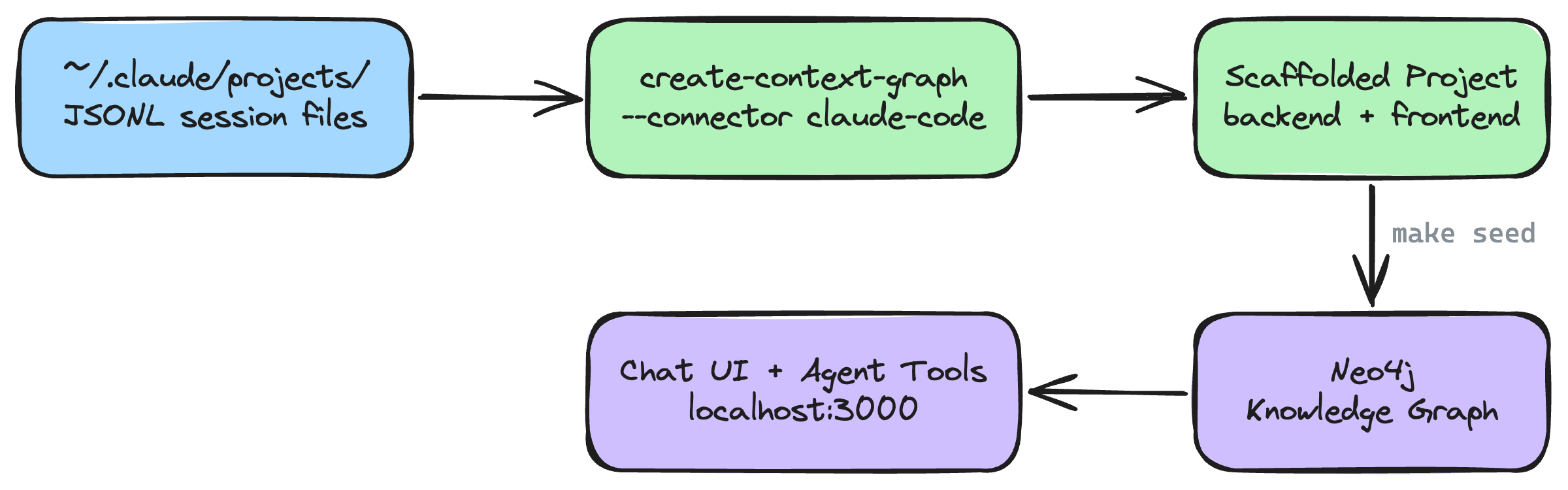
The CLI reads your local Claude Code session files, extracts entities (files, decisions, preferences, errors) and relationships, scaffolds a full-stack application, and seeds the data into Neo4j. The generated agent uses the 8 tools above to query the graph and answer questions about your development history.
Prerequisites
Before you begin, make sure you have:
- Python 3.11+ -- check with
python3 --version - Node.js 18+ -- check with
node --version - Neo4j -- one of:
- Neo4j Aura (free cloud instance)
- Docker:
docker run -p 7474:7474 -p 7687:7687 -e NEO4J_AUTH=neo4j/password neo4j:5 - neo4j-local:
npx @johnymontana/neo4j-local
- uv (recommended) -- install with
curl -LsSf https://astral.sh/uv/install.sh | sh - Claude Code session history -- at least one session in
~/.claude/projects/ - An LLM API key (required for the chat agent) --
ANTHROPIC_API_KEY(for most frameworks) orOPENAI_API_KEY/GOOGLE_API_KEYdepending on your framework choice
If you see requires-python >= 3.11 errors during installation, your active Python is too old. Common fixes:
- pyenv:
pyenv install 3.12 && pyenv local 3.12 - Homebrew (macOS):
brew install python@3.12 - Ubuntu (deadsnakes PPA):
sudo add-apt-repository ppa:deadsnakes/ppa && sudo apt install python3.12 - uv:
uv python install 3.12
Check with python3 --version (not just python --version, which may point to an older version on some systems).
You can check if you have Claude Code session data by running:
ls ~/.claude/projects/
Each directory represents a project, with session files (.jsonl format) inside containing your session history.
How Claude Code stores session data
Claude Code saves every session as a JSONL file in ~/.claude/projects/, organized by project path:
~/.claude/projects/
  -Users-will-projects-my-api/          # Project directory (encoded path)
    a1b2c3d4-session-uuid.jsonl         # Session file
    e5f6g7h8-session-uuid.jsonl
  -Users-will-projects-frontend/
    ...
Each JSONL file contains a timestamped sequence of:
- User messages -- your prompts and corrections
- Assistant messages -- Claude's responses with tool_use blocks (Read, Write, Edit, Bash, etc.)
- Tool results -- outputs from each tool call, including errors
- Progress entries -- subagent activity from Agent tool invocations
This structured data is a natural fit for a context graph -- every session is a conversation with entities (files, packages, decisions), relationships (tool calls that modify files, errors that get resolved), and temporal chains.
Step 1: Scaffold the Project (~2 min)
Run the CLI with the --connector claude-code flag:
uvx create-context-graph my-dev-graph \
  --domain software-engineering \
  --framework claude-agent-sdk \
  --connector claude-code
By default, the connector imports sessions from the project matching your current working directory. To import from all projects:
uvx create-context-graph my-dev-graph \
  --domain software-engineering \
  --framework claude-agent-sdk \
  --connector claude-code \
  --claude-code-scope all
The import runs immediately during scaffolding:
Importing data from connected services...
  Connecting to Claude Code...
  Fetching data from Claude Code...
  ✓ Claude Code: 342 entities, 12 documents
Customizing the import
| Flag | Default | Description |
|---|---|---|
--claude-code-scope | current | current imports sessions matching your cwd; all imports every project |
--claude-code-project | -- | Explicit project path to filter (e.g., /Users/will/projects/my-api) |
--claude-code-since | all time | ISO date; only import sessions modified after this date |
--claude-code-max-sessions | 0 (all) | Limit the number of sessions imported (most recent first) |
--claude-code-content | truncated | full stores complete message text, truncated limits to 2000 chars, none stores metadata only |
Import a specific project with a time window
uvx create-context-graph my-api-graph \
  --domain software-engineering \
  --framework pydanticai \
  --connector claude-code \
  --claude-code-project /Users/will/projects/my-api \
  --claude-code-since 2026-03-01 \
  --claude-code-max-sessions 50
Step 2: Configure and Seed (~3 min)
Navigate to your project:
cd my-dev-graph
Configure your environment. The scaffolded project generates a .env file with working Neo4j defaults. Edit it with your credentials:
# .env (already generated — edit in place, don't overwrite)
NEO4J_URI=neo4j://localhost:7687
NEO4J_USERNAME=neo4j
NEO4J_PASSWORD=password          # change to match your Neo4j instance
ANTHROPIC_API_KEY=sk-ant-...     # required for the chat agent in Step 4
The chat agent in Step 4 requires an ANTHROPIC_API_KEY (or OPENAI_API_KEY / GOOGLE_API_KEY depending on your framework). Without it, the graph visualization, document browser, and decision trace viewer will work, but the chat panel will return an error.
If you're using Neo4j Aura, set NEO4J_URI=neo4j+s://xxxxxxxx.databases.neo4j.io with the connection URI from your Aura console.
Install dependencies for both backend and frontend:
make install
Verify your Neo4j connection (optional but recommended):
make test-connection
Seed the data into Neo4j:
make seed
You should see output similar to:
Creating schema constraints and indexes...
Loading fixture data...
  Created 342 entities across 10 node labels
  Created 856 relationships across 14 relationship types
  Created 12 documents with MENTIONS links
  Created 4 decision traces
Done. Knowledge graph ready.
To confirm your data loaded correctly, you can query the Neo4j instance directly:
make test-connection
This should print "Neo4j connection successful". The exact entity counts depend on the number and size of your Claude Code sessions.
Step 3: Start the Application (~1 min)
The application has two components: a FastAPI backend (port 8000) and a Next.js frontend (port 3000).
Using make start (recommended):
make start
This runs both the backend and frontend concurrently. You should see:
Starting backend on http://localhost:8000...
Starting frontend on http://localhost:3000...
Alternative: two separate terminals (useful for debugging):
# Terminal 1: Backend
cd backend && make dev

# Terminal 2: Frontend
cd frontend && npm run dev
Once both are running, open http://localhost:3000 in your browser.
Step 4: Explore Your Session Graph (~10 min)
Schema view
When the app loads, the graph visualization shows the schema view -- the entity types and relationships imported from your sessions:
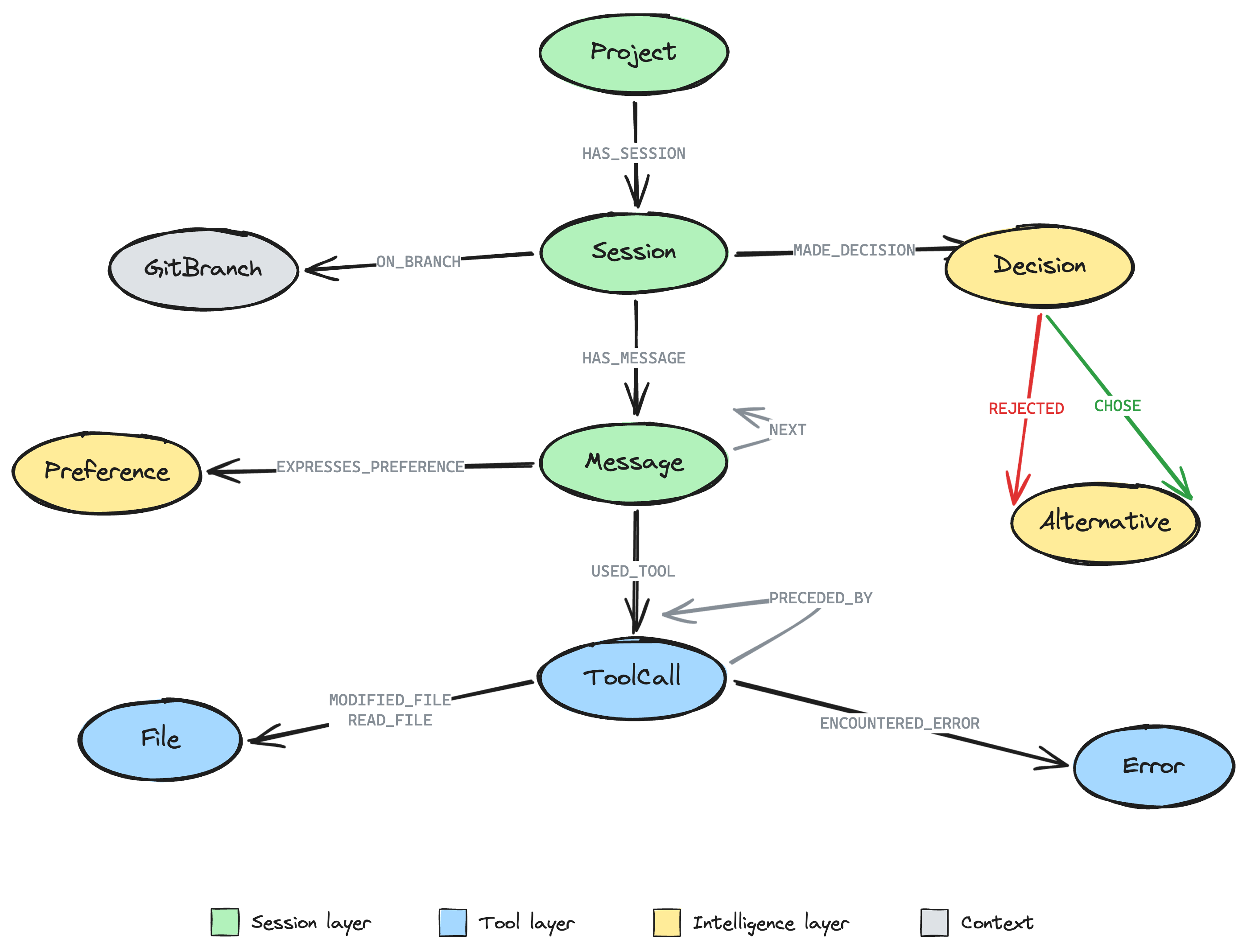
- Project nodes representing each project directory, connected to Session nodes via
HAS_SESSION - Session nodes linked to Message nodes via
HAS_MESSAGE, withNEXTchains preserving conversation order - ToolCall nodes connected to Messages via
USED_TOOL, withPRECEDED_BYchains showing reasoning sequences - File nodes linked from ToolCalls via
MODIFIED_FILEandREAD_FILE - Decision nodes (extracted from corrections and deliberations) with
CHOSEandREJECTEDalternatives - Preference nodes capturing your coding style, framework choices, and tool configuration
- Error nodes linked to the ToolCalls that produced them via
ENCOUNTERED_ERROR - GitBranch nodes connected to Sessions via
ON_BRANCH
Double-click any schema node to load actual instances.
Ask the agent about your sessions
The agent has 8 session intelligence tools available:
| Tool | What it does |
|---|---|
search_sessions | Full-text search across session message content |
decision_history | Find decisions related to a file, package, or topic |
file_timeline | Show modification/read history of a file across sessions |
error_patterns | Find recurring errors and how they were resolved |
tool_usage_stats | Analytics on tool usage across sessions |
my_preferences | Retrieve extracted preferences, optionally by category |
project_overview | Summary stats for a project or all projects |
reasoning_trace | Trace the tool call chain for a specific session |
Try these questions in the chat panel:
- "What decisions have I made about authentication?" -- Searches Decision nodes by keyword
- "Show me the history of config.py" -- File modification timeline across all sessions
- "What errors have I encountered most often?" -- Error frequency and resolution patterns
- "What are my coding preferences?" -- Lists extracted preferences with confidence scores
- "What tools do I use most?" -- Tool usage analytics across sessions
- "Give me an overview of my projects" -- Session counts, token usage, decision counts
- "Trace the reasoning for yesterday's session" -- Tool call sequence with inputs/outputs
- "Search my sessions for GraphQL" -- Full-text search across message content
Graph visualization
As you chat with the agent, the graph visualization updates in real-time:
- Double-click a Session node to see its messages, tool calls, and decisions
- Double-click a File node to see all sessions that touched it
- Double-click a Decision node to see the alternatives that were considered and rejected
- Click any node to inspect its properties in the detail panel
- Use the "Ask about this" button to query a specific entity
Understanding the Graph Schema
Entity types
| Session Concept | Graph Label | Key Properties |
|---|---|---|
| Project directory | Project | name (decoded path), encodedPath, sessionCount |
| JSONL session file | Session | sessionId, startedAt, endedAt, branch, messageCount, totalInputTokens, totalOutputTokens |
| User/assistant message | Message | uuid, role, content (truncated), timestamp |
| Tool invocation | ToolCall | toolName, input, output, isError, timestamp |
| Source code file | File | path, language, modificationCount, readCount |
| Git branch | GitBranch | name, project |
| Tool call error | Error | message, timestamp |
| Extracted decision | Decision | description, category, confidence, outcome |
| Decision option | Alternative | description, wasChosen, reason |
| Coding preference | Preference | category, value, confidence, sessionCount |
Relationship types
| Relationship | From | To | Meaning |
|---|---|---|---|
HAS_SESSION | Project | Session | Project contains session |
HAS_MESSAGE | Session | Message | Session contains message |
NEXT | Message | Message | Sequential message order |
USED_TOOL | Message | ToolCall | Assistant invoked a tool |
PRECEDED_BY | ToolCall | ToolCall | Tool call sequence (reasoning chain) |
MODIFIED_FILE | ToolCall | File | Write/Edit tool changed a file |
READ_FILE | ToolCall | File | Read/Grep/Glob tool accessed a file |
ON_BRANCH | Session | GitBranch | Session was on this git branch |
ENCOUNTERED_ERROR | ToolCall | Error | Tool call produced an error |
MADE_DECISION | Session | Decision | Decision was made during session |
CHOSE | Decision | Alternative | The chosen approach |
REJECTED | Decision | Alternative | A rejected approach |
RESULTED_IN | Decision | ToolCall | Action taken after decision |
EXPRESSES_PREFERENCE | Message | Preference | Message reveals a preference |
Decision extraction
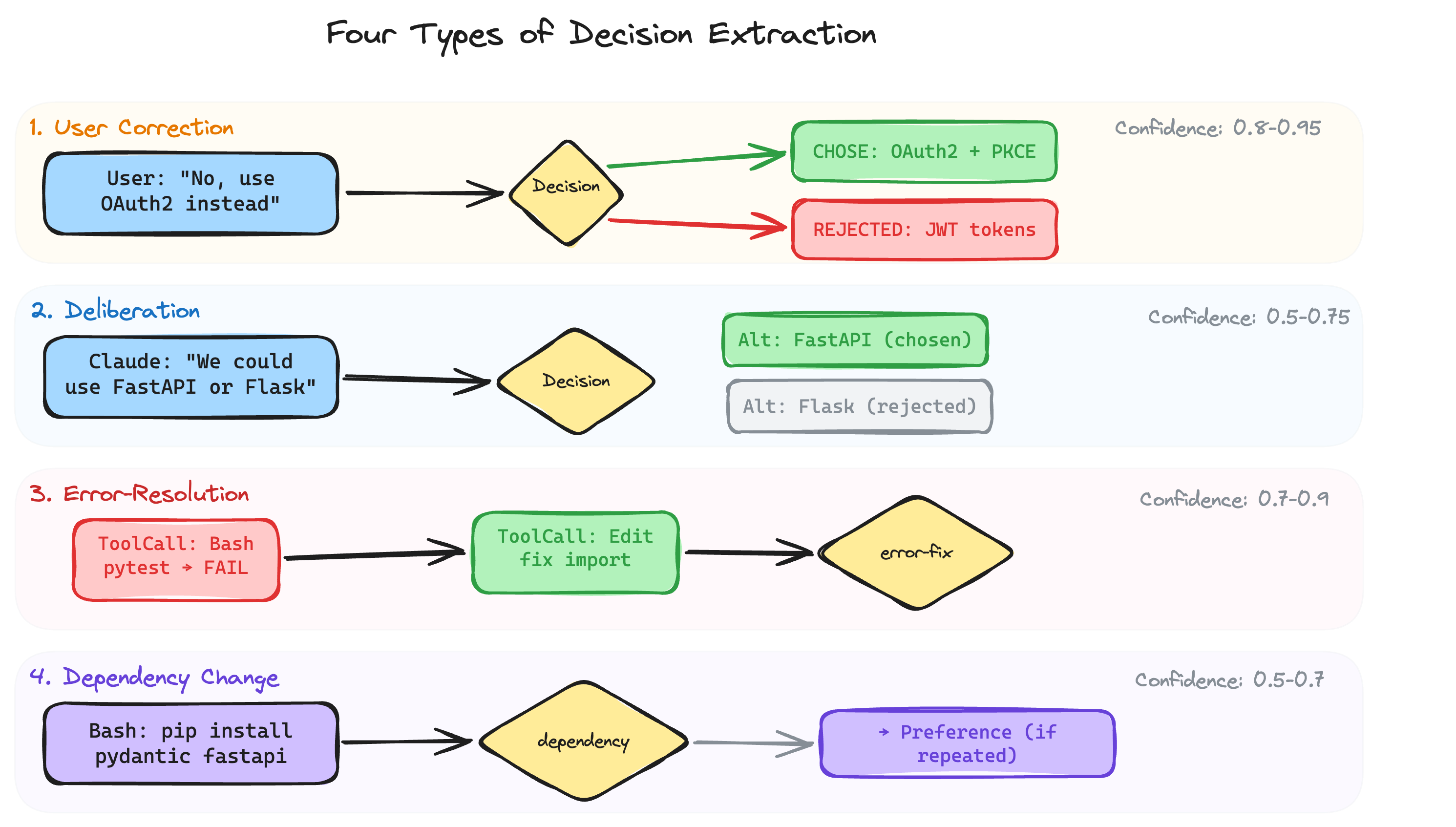
The connector identifies four types of decisions automatically:
-
User corrections -- When you redirect Claude's approach ("No, use OAuth2 instead of JWT"), the original approach becomes a rejected alternative and your correction becomes the chosen one.
-
Deliberation markers -- When Claude discusses trade-offs ("We could use FastAPI or Flask, the trade-off is..."), the alternatives and reasoning are captured.
-
Error-resolution cycles -- When a tool call fails and Claude fixes it, the error and resolution are linked as a decision about how to fix the problem.
-
Dependency changes -- Package install commands (
pip install,npm install, etc.) are captured as dependency decisions.
Each decision includes a confidence score (0.0--1.0) indicating how certain the extractor is that this is a real decision point.
Preference extraction
Preferences are extracted from two sources:
- Explicit statements -- Messages like "always use single quotes", "prefer FastAPI over Flask", "use ruff for linting" are detected via pattern matching.
- Package frequency -- Packages installed across multiple sessions indicate framework preferences (e.g., always installing
pytestandruff).
Each preference includes a category (coding_style, framework_choice, testing_approach, tool_configuration, naming_convention, documentation) and a confidence score that increases when the same preference appears across multiple sessions.
Example Cypher Queries
Run these in Neo4j Browser (http://localhost:7474) or via the agent's run_cypher tool:
Most-modified files across all sessions
MATCH (f:File)
WHERE f.modificationCount > 0
RETURN f.path AS file, f.language AS language,
       f.modificationCount AS modifications,
       f.readCount AS reads
ORDER BY f.modificationCount DESC
LIMIT 20
Example result:
| file | language | modifications | reads |
|---|---|---|---|
src/api/routes.py | python | 14 | 38 |
src/models/user.py | python | 9 | 22 |
tests/test_auth.py | python | 7 | 15 |
Decision history for a specific file
MATCH (d:Decision)-[:RESULTED_IN]->(:ToolCall)-[:MODIFIED_FILE]->(f:File)
WHERE f.path CONTAINS 'config'
OPTIONAL MATCH (d)-[:CHOSE]->(chosen:Alternative)
OPTIONAL MATCH (d)-[:REJECTED]->(rejected:Alternative)
RETURN d.description AS decision, d.category AS type,
       chosen.description AS chosen_approach,
       rejected.description AS rejected_approach,
       d.timestamp AS when
ORDER BY d.timestamp DESC
Example result:
| decision | type | chosen_approach | rejected_approach | when |
|---|---|---|---|---|
| Switch auth config to OAuth2 | correction | Use OAuth2 with PKCE | JWT with refresh tokens | 2026-03-28T14:22:00 |
| Add rate limiting config | deliberation | Token bucket algorithm | Fixed window counter | 2026-03-25T10:15:00 |
Error patterns and resolutions
MATCH (e:Error)<-[:ENCOUNTERED_ERROR]-(tc:ToolCall)
RETURN e.message AS error, tc.toolName AS tool,
       count(*) AS occurrences
ORDER BY occurrences DESC
LIMIT 15
Example result:
| error | tool | occurrences |
|---|---|---|
ModuleNotFoundError: No module named 'pydantic' | Bash | 4 |
SyntaxError: unexpected indent | Edit | 3 |
FileNotFoundError: config.yaml | Read | 2 |
Tool usage breakdown
MATCH (tc:ToolCall)
RETURN tc.toolName AS tool, count(*) AS usage_count
ORDER BY usage_count DESC
Example result:
| tool | usage_count |
|---|---|
| Read | 245 |
| Edit | 128 |
| Bash | 97 |
| Write | 43 |
| Grep | 38 |
All extracted preferences
MATCH (p:Preference)
RETURN p.value AS preference, p.category AS category,
       p.confidence AS confidence, p.sessionCount AS seen_in_sessions
ORDER BY p.confidence DESC
Example result:
| preference | category | confidence | seen_in_sessions |
|---|---|---|---|
| Use ruff for linting | tool_configuration | 0.92 | 8 |
| Prefer pytest over unittest | testing_approach | 0.85 | 6 |
| Use single quotes for strings | coding_style | 0.78 | 5 |
Sessions on a specific git branch
MATCH (s:Session)-[:ON_BRANCH]->(b:GitBranch {name: 'feature/auth'})
RETURN s.name AS session, s.startedAt AS started,
       s.messageCount AS messages, s.totalOutputTokens AS tokens
ORDER BY s.startedAt DESC
Example result:
| session | started | messages | tokens |
|---|---|---|---|
| Implement OAuth2 flow | 2026-03-28T14:00:00 | 42 | 18500 |
| Add auth middleware | 2026-03-27T09:30:00 | 28 | 12200 |
| Set up auth routes | 2026-03-26T16:15:00 | 35 | 15800 |
Combining with Other Connectors
The Claude Code connector works alongside other connectors. Combine it with GitHub for a complete development context graph:
uvx create-context-graph my-full-dev-graph \
  --domain software-engineering \
  --framework pydanticai \
  --connector claude-code \
  --connector github \
  --claude-code-scope current
Now the agent can correlate your Claude Code sessions with GitHub issues, pull requests, and commits -- connecting the why (session decisions) with the what (code changes).
Privacy and Security
The Claude Code connector is designed with privacy in mind:
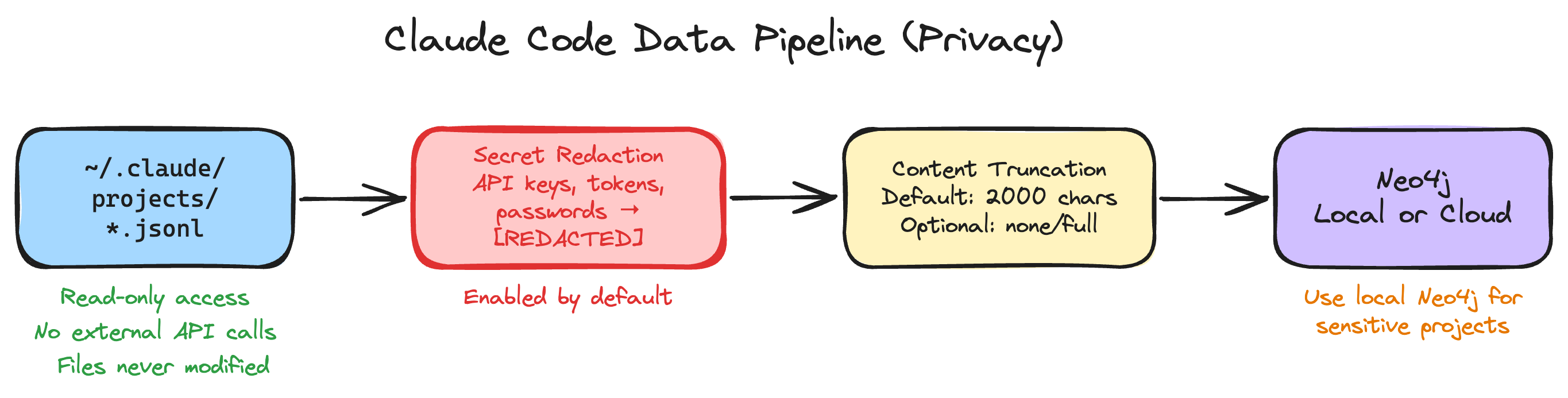
- Local data only: All data is read from your local
~/.claude/projects/directory. Nothing is sent to external services. - Secret redaction: API keys, tokens, passwords, and connection strings are automatically detected and replaced with
[REDACTED]before storage. This is enabled by default. - Content truncation: By default, message content is truncated to 2000 characters. Use
--claude-code-content noneto store only metadata (no message text at all). - Read-only access: The connector never modifies or deletes your original JSONL files.
- No external dependencies: The connector uses only Python's standard library -- no third-party API clients required.
If you import sessions into a cloud Neo4j instance (e.g., Neo4j Aura), be aware that your session content -- including code snippets, file paths, and conversation text -- will be stored in the cloud. For sensitive projects, use a local Neo4j instance.
Re-importing Updated Data
As you create new Claude Code sessions, re-import to keep the graph current:
# Re-import from Claude Code
make import

# Re-import and seed into Neo4j
make import-and-seed
The import uses MERGE operations, so re-importing is safe -- existing nodes are updated rather than duplicated.
.envTo change the import scope after scaffolding, edit the Claude Code settings in your .env file:
# Import all projects (not just current directory)
CLAUDE_CODE_SCOPE=all

# Limit to recent sessions
CLAUDE_CODE_SINCE=2026-04-01

# Import at most 50 sessions
CLAUDE_CODE_MAX_SESSIONS=50

# Store full message content (default: truncated to 2000 chars)
CLAUDE_CODE_CONTENT_MODE=full
These settings only affect make import / make import-and-seed. The initial scaffold import uses the CLI flags instead.
Because seed uses MERGE by name, re-seeding updates existing nodes rather than creating duplicates. However, sessions that were deleted from ~/.claude/projects/ will remain as stale nodes in Neo4j. To start fresh, run make reset before make import-and-seed.
Troubleshooting
make seed fails with a connection error
Ensure Neo4j is running and your .env credentials are correct:
make test-connection
If this fails, verify that NEO4J_URI, NEO4J_USERNAME, and NEO4J_PASSWORD in your .env file match your Neo4j instance. For Neo4j Aura, the URI should start with neo4j+s://.
No sessions found during import
The connector looks for session files in ~/.claude/projects/. Verify you have session data:
ls ~/.claude/projects/
If the directory is empty or doesn't exist, you need to use Claude Code at least once to generate session history.
--claude-code-scope current imports nothing
The current scope matches your working directory to a project path in ~/.claude/projects/. Run the CLI from the same directory where you used Claude Code, or use --claude-code-project /path/to/project to specify the project path explicitly.
Python version error during scaffold
If you see requires-python >= 3.11 errors, see the Python version guidance in Prerequisites above.
Frontend fails to start
Make sure you ran make install before make start. If the error persists, install frontend dependencies manually:
cd frontend && npm install
Port already in use
The backend uses port 8000 and the frontend uses port 3000. If either port is occupied:
# Find and kill the process on a specific port
lsof -ti:8000 | xargs kill
lsof -ti:3000 | xargs kill
Next Steps
- Import all projects -- Use
--claude-code-scope allto build a cross-project knowledge graph - Combine connectors -- Add
--connector githubor--connector linearfor the full development lifecycle - Customize agent tools -- Edit the generated
agent.pyto add project-specific Cypher queries - Explore the How Decision Traces Work explainer for the conceptual model behind decision extraction across connectors
- Check the Claude Code Session Schema reference for the complete list of entity types, relationships, and properties
Ready for more? Continue with Building Your First Linear Context Graph to learn how to import real project data from Linear.